AI fleet command for tracking providers

Run every customer fleet from one intelligent command platform.

CIQ brings live tracking, customer administration, events, reports, device operations and AI fleet intelligence together in one scalable platform.

Built on live operations—not a prototype.
LIVE CIQ SHOWCASE

Actual CIQ tracking workspace · Isolated demo fleet

Open full screen
REAL CIQ APPLICATION

The same tracking interface, permissions and data pipeline used by CIQ operators. Showcase vehicles are isolated from customer fleets.

41M+GPS positions processed
2,000+active tracked objects
68K+fleet events recorded
30K+emails delivered

Production data
August 2026

The CIQ selling edge

Everything a tracking provider needs to sell, operate and scale.

CIQ joins the customer control layer, live fleet operation and intelligence layer in one provider-grade platform.

36 core capabilities across 6 operating systems
01Provider command

Operate above every customer fleet

A provider-first control layer for complex tracking businesses—not a single-fleet dashboard stretched across customers.

  • Multi-account operations
  • Reseller hierarchy
  • Customer fleet isolation
  • Object and group access
  • Eight role types + custom roles
  • Full operational audit trail
02Live operations

Know what is happening now

Turn continuous location and device signals into an immediate operating picture for every permitted team.

  • Real-time vehicle tracking
  • Moving, idle, stopped and offline states
  • Journey and route history
  • Places and geofences
  • Events and alert routing
  • Remote command dispatch
03Fleet intelligence

AI grounded in fleet reality

CIQ AI works inside the permitted account context, connecting live status, history and operational signals.

  • Fleet-aware Copilot
  • Daily operational briefs
  • Incident summaries
  • Management reports
  • Predictive signals
  • Dispatch and message recommendations
04Reports & delivery

Make service visible to customers

Build repeatable customer reporting around the questions tracking customers ask every day.

  • 80 report templates
  • Scheduled generation
  • PDF, XLSX, CSV, HTML and JSON
  • Trips, mileage and zones
  • Driver behaviour and events
  • Maintenance and diagnostics
05Device & data layer

A protocol stack that grows with you

Bring mixed device estates into native ingestion pipelines with transparent compatibility status.

  • TCP, UDP and HTTP ingestion
  • Coban / TK support
  • FifoTrack and TopTen
  • Android tracker
  • Sensors and DTC data
  • Provider-led protocol programme
06Fleet workflows

Connect assets, people and service

Keep the operating relationships around each vehicle accessible from the same system of record.

  • Drivers, trailers and passengers
  • Maintenance schedules
  • Groups and branches
  • Journeys and assignments
  • Mobile tracking
  • Event noise reduction
PRODUCTION PROOF

Already operating across 711 accounts, 2,137 active objects and more than 41 million GPS positions.

See it against your operation

The real product

See CIQ at work—not a concept dashboard.

These are privacy-safe captures from the live CIQ platform. The interface, workflows and operating surfaces are real.

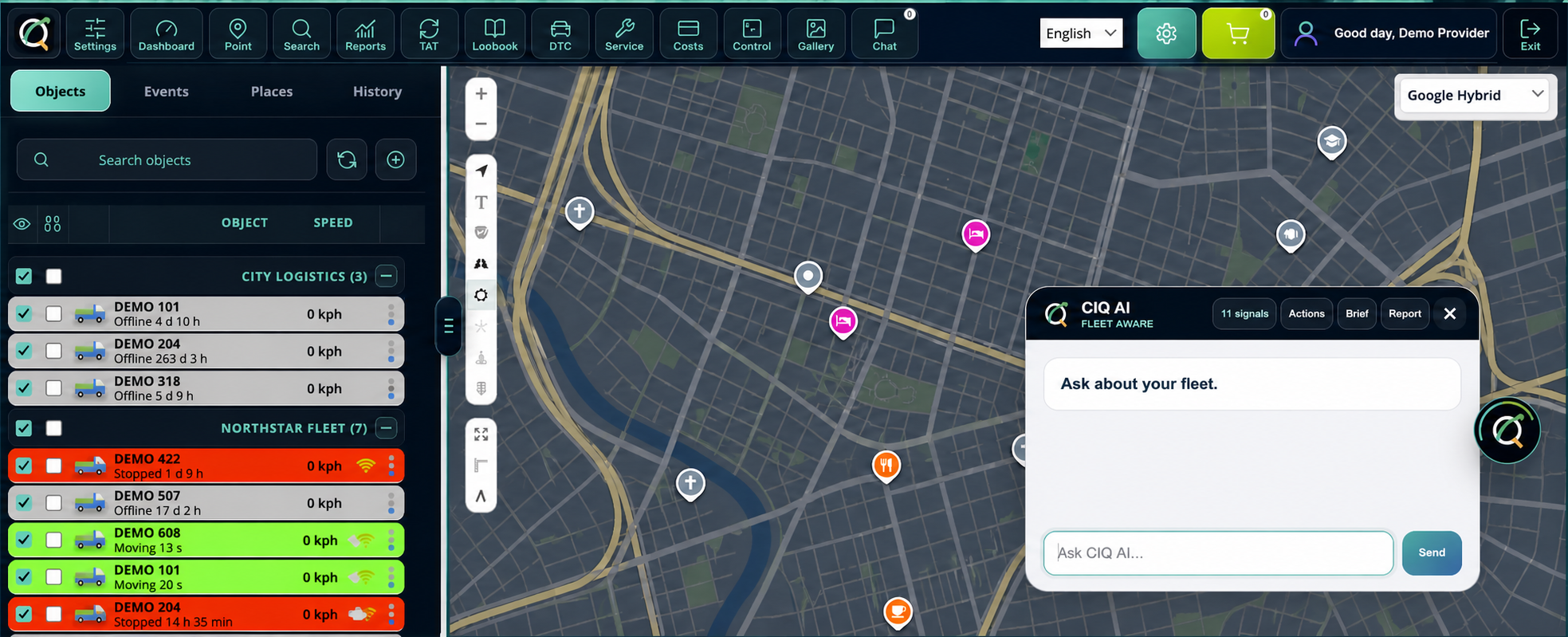
LIVE OPERATIONSCIQ AI inside the tracking workspace
Real CIQ Fleet Command screen with the CIQ AI assistant open
01 / COMMAND

Intelligence lives where operators already work.

CIQ AI opens directly over the live fleet workspace, with permitted fleet context, operational signals, briefs and management reporting within reach.

  • Fleet-aware questions
  • Signal prioritisation
  • Briefs and reports
  • Action support
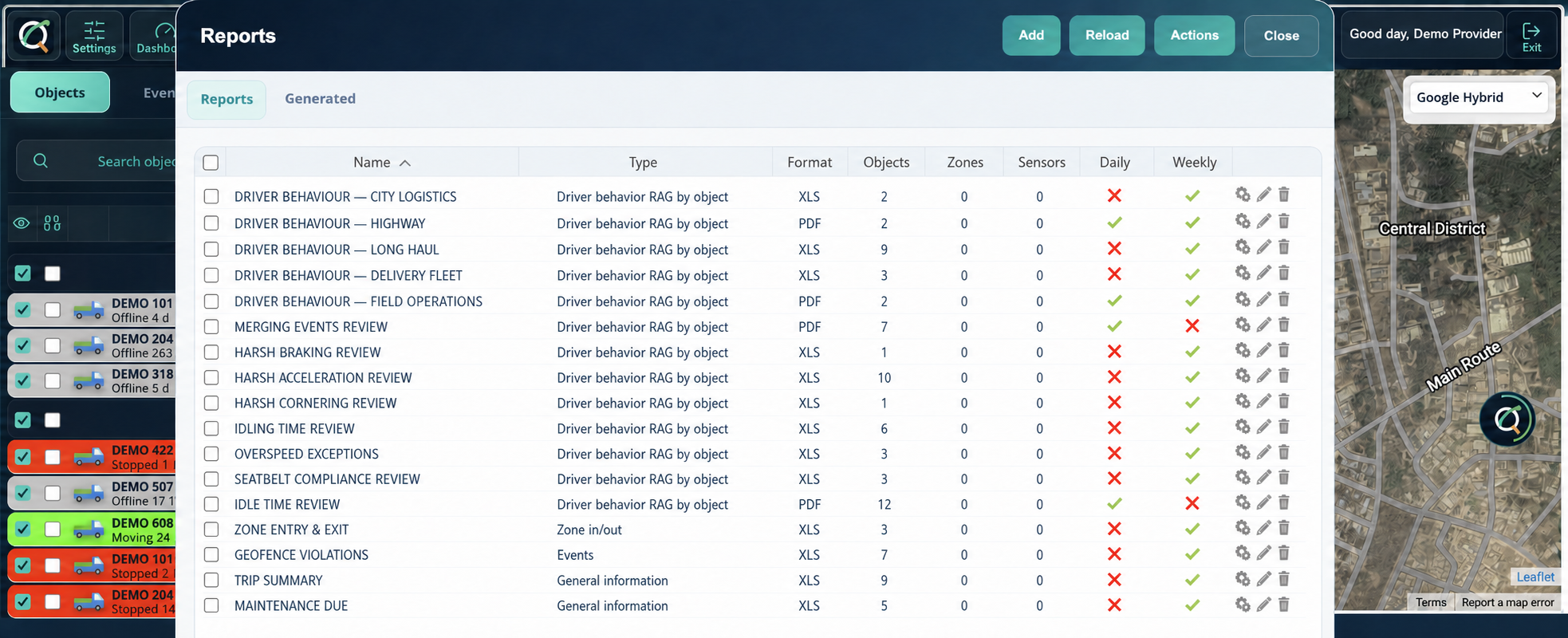
REPORT OPERATIONSTemplates, schedules and delivery
Real CIQ reporting screen with report templates and delivery schedules
02 / REPORT

Customer reporting is an operating system—not an export button.

Create and manage recurring templates across driver behaviour, events, trips, zones, maintenance and compliance, then deliver in the formats customers expect.

  • PDF and XLS output
  • Daily and weekly schedules
  • Object and zone scope
  • Reusable templates

Provider operations, unified

The infrastructure behind a serious tracking business.

One operational system for your customers, teams, devices, intelligence and service delivery.

01
TSDLFSProvider account

Operate every customer fleet

Create separate customer accounts, control object access, assign roles, and move between operations without losing context.

Multi-account · Reseller hierarchy · Scoped access
02
TCPUDPHTTP)))

Connect devices your way

Ingest live device data through native TCP, UDP, and HTTP pipelines with a protocol programme that grows around provider demand.

Coban · FifoTrack · TopTen · Android
03

Power cut detected

AIPrioritized

Turn signals into action

Evaluate device events, reduce duplicate noise, route alerts, execute commands, and maintain an auditable operational trail.

Events · Commands · Notifications · Audit

CIQ AI Fleet Command

AI that works with your actual fleet operations.

CIQ connects live vehicle status, events, journeys, maintenance and historical data to deliver evidence-backed answers—not generic chat.

  • 01 Ask questions about any permitted vehicle or fleet
  • 02 Generate daily briefs, incident summaries and management reports
  • 03 Surface recurring events, maintenance risk and connectivity exposure
  • 04 Recommend dispatch candidates and draft operational messages
See AI Fleet Command
Fleet CopilotPowered by live CIQ data
CONTEXTAll customer fleets2,137 active objects
Which vehicles need attention today?

Five vehicles need operator review. I prioritized them by operational risk:

  1. LG-042-AARepeated power-cut events · Critical
  2. KJA-918-BDOffline for 8h 12m · High
  3. ABJ-230-TRMaintenance overdue by 6 days · High
3 vehicles9 events2 service schedules
Ask CIQ about this fleet…

Reports that leave the platform

Turn tracking data into customer-ready intelligence.

Build, schedule and deliver operational reports in the formats your customers already work with.

PDFXLSCSVHTMLJSON
981reports generated on the current CIQ platform
01General information
02Drives & stops
03Travel sheet
04Mileage
05Zone in / out
06Events
07DTC diagnostics
08Sensors
09Current position
10Object information

Control without overlap

Your operation above every customer account.

CIQ’s account architecture separates customer fleets while giving authorized provider teams the visibility and controls they need.

01

Customer architecture

Separate fleet accounts with parent and reseller relationships.

02

Role precision

Owner, admin, dispatcher, driver, finance, technician, viewer and custom roles.

03

Object-level access

Limit teams to selected vehicles, groups, drivers, branches or journeys.

04

Operational accountability

Trace sign-ins, changes, commands, reports and critical actions.

Honest device compatibility

A native protocol programme built around real provider demand.

CIQ publishes clear support levels so your technical team knows what is production-active, being field-tested, or awaiting integration.

Request a protocol integration
ProtocolStatus
Coban / TK seriesNative active
FifoTrackNative active
TopTenNative active
Android trackerNative active
BenwayField validation
CanTrack / HQPartial support

The provider programme

Built for today. Growing into your brand.

AVAILABLE NOW

Provider operations

Multi-account control, reseller hierarchy, tracking, reports, AI and auditable operations.

IN DEVELOPMENT

Deeper white-label control

Provider themes, customer-facing branding and expanded service configuration.

PLANNED

Commercial automation

Custom domains, subscriptions, local payments, commissions and customer self-service.

A controlled path to CIQ

Move platforms without gambling with live operations.

Migration is treated as an operational programme—not a one-click promise. CIQ validates the provider model and device data path before fleets move.

Built around your estateCustomer structure · Device mix · Operating workflows · Reporting commitments
01

Map your operation

We review your customer structure, users, vehicles, devices, protocols and reporting obligations.

02

Validate the data path

Your priority devices are connected and tested against real messages before operational cutover.

03

Move in controlled stages

Accounts, teams and fleets transition in agreed groups with access and reporting checks.

04

Command from CIQ

Your operators go live with provider-level visibility, auditability and a clear support path.

Provider questions

Clear answers before the demo.

We’d rather be precise about what is live, what is being built and how a provider moves onto CIQ.

01Is CIQ built for fleet owners or tracking providers?+

CIQ is designed first for tracking service providers that operate multiple customer fleets. The account, reseller, permission and object-access model reflects that structure.

02Can CIQ replace an existing tracking platform?+

Yes. Migration starts with your customer hierarchy, device estate and critical workflows. Protocol compatibility is validated before a staged operational move.

03Does the AI have access to every customer?+

No. CIQ AI works within the same permitted account and object boundaries as the operator using it. Responses are grounded in the fleet data that user is allowed to access.

04Which tracking devices are supported?+

Coban/TK, FifoTrack, TopTen and the Android tracker are active native integrations. Benway is in field validation, with CanTrack/HQ partially supported. Additional protocols are prioritised around provider demand.

05Is white-labelling available?+

Deeper provider theming and customer-facing branding are in development. Custom domains and commercial automation are part of the planned provider programme.

Built for tracking providers

See what your tracking business can run on CIQ.

Bring your customer model, device mix and operational requirements. We’ll show you the platform against the way your business actually works.

01 Provider account walkthrough02 Live tracking and AI operations03 Protocol and migration review
REQUEST A PROVIDER DEMO

Tell us enough to make the session useful. We’ll focus the walkthrough on your operation.

Submitting opens your email app with the details prepared. No data is stored on this website.